Ports and Connections
Reactors can send and receive messages to or from other reactors using input and output ports. The ports of a reactor define its interface. Outputs of one reactor can be connected to the inputs of others, which gives a natural way to compose programs from simple building blocks.
Simple Connections
Consider the following reactor.
class Counter : public sdk::Reactor {
public:
  using sdk::Reactor::Reactor;
  [[nodiscard]] auto output() const -> const auto& { return output_; }

private:
  sdk::PeriodicTimer timer_{"timer", context(), 100ms};
  sdk::OutputPort<std::uint64_t> output_{"output", context()};
  std::uint64_t count_{0};

  class IncrementReaction : public sdk::Reaction<Counter> {
    using sdk::Reaction<Counter>::Reaction;
    Trigger<void> timer_trigger{self().timer_, context()};
    PortEffect<std::uint64_t> output_effect{self().output_, context()};
    void handler() final { output_effect.set(++self().count_); }
  };

  void assemble() final { add_reaction<IncrementReaction>("increment"); }
};
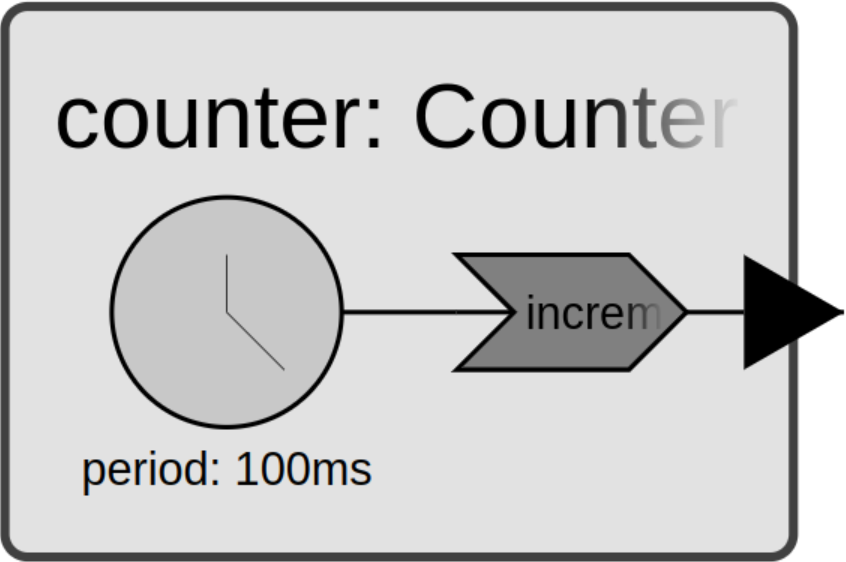
It implements a counting mechanism, similar to the Timed reactor from
Periodic Timers. In addition to the timer, it declares an
OutputPort called output_, exposed via a
public getter. The IncrementReaction is triggered by the timer and uses a
PortEffect to write the updated count to the port. Setting a value on the port
notifies any reactions that are triggered by a connected port.
For instance, we can define a Printer reactor that prints whatever it receives.
class Printer : public sdk::Reactor {
public:
  using sdk::Reactor::Reactor;
  [[nodiscard]] auto input() const -> const auto& { return input_; }

private:
  sdk::InputPort<std::uint64_t> input_{"input", context()};

  class PrintReaction : public sdk::Reaction<Printer> {
    using sdk::Reaction<Printer>::Reaction;
    Trigger<std::uint64_t> input_trigger{self().input_, context()};
    void handler() final {
      auto elapsed = std::chrono::duration_cast<std::chrono::milliseconds>(
          elapsed_time());
      std::cout << self().name() << " received " << *input_trigger.get()
                << " at " << elapsed << '\n';
    }
  };

  void assemble() final { add_reaction<PrintReaction>("print"); }
};
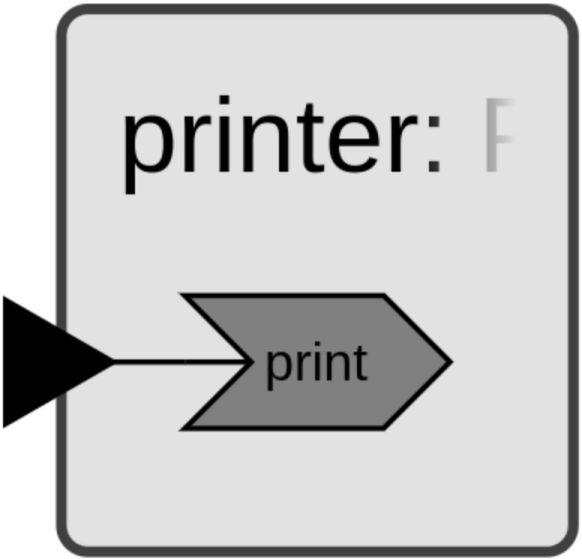
This reactor declares an InputPort called
input_, exposed via a public getter. The PrintReaction uses a
Trigger<std::uint64_t> to read the received value with get(), which returns
a ValueView<T> — dereference it with * to access the value. The view
borrows the value stored in the port and stays valid for the duration of the reaction handler; to keep the
value beyond that, copy the view into a Value<T>.
Now we can write a main() function that instantiates and connects both reactors.
auto main() -> int {
  sdk::Environment env{};
  Counter counter{"counter", env.context()};
  Printer printer{"printer", env.context()};
  env.connect(counter.output(), printer.input());
  env.execute();
  return 0;
}
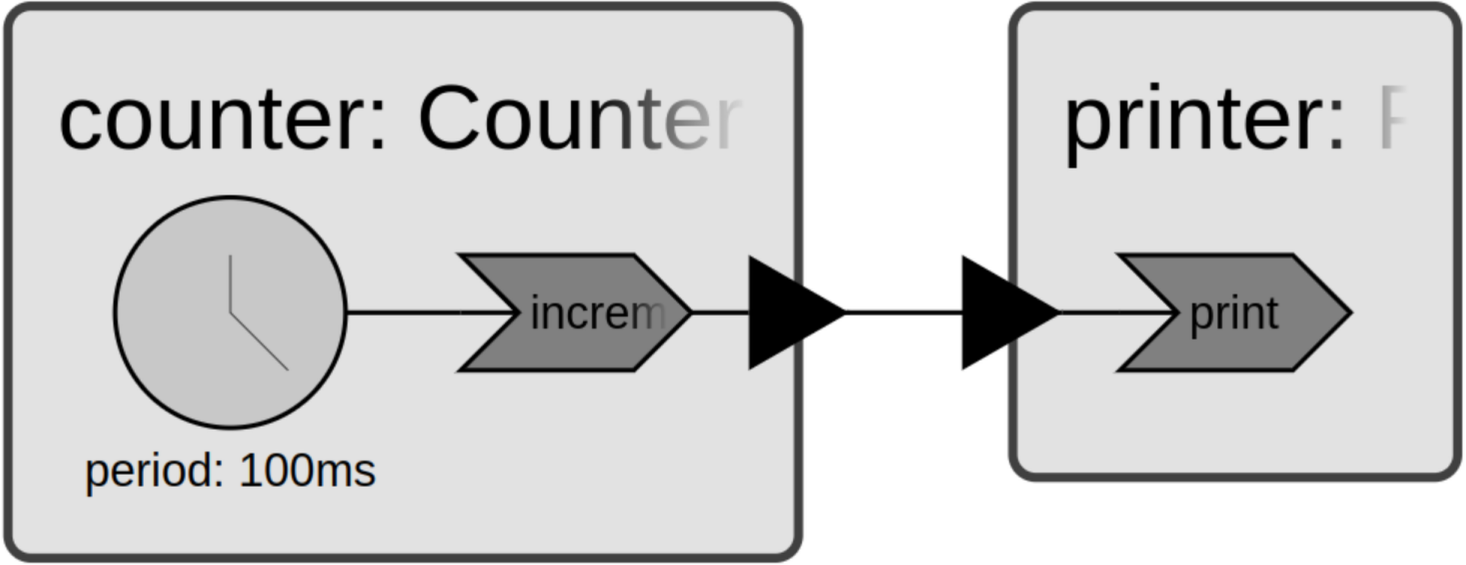
Copy all three pieces into a new file called ports.cc, then create a
CMakeLists.txt in the same directory:
cmake_minimum_required(VERSION 3.28)

project(ports LANGUAGES CXX)

set(XRONOS_SDK_VERSION "0.14.0" CACHE STRING "Xronos SDK version")
include(FetchContent)
FetchContent_Declare(
  "xronos-sdk"
  URL https://github.com/xronos-inc/xronos/releases/download/v${XRONOS_SDK_VERSION}/xronos-sdk-${XRONOS_SDK_VERSION}-Linux-${CMAKE_SYSTEM_PROCESSOR}.tar.gz
)
FetchContent_MakeAvailable(xronos-sdk)
set(xronos-sdk_DIR ${xronos-sdk_SOURCE_DIR}/share/cmake/xronos-sdk)

find_package(xronos-sdk)

add_executable(ports ports.cc)
target_link_libraries(ports xronos::xronos-sdk)
Configure, build, and run:
$ cmake -B build
$ cmake --build build --target ports
$ ./build/ports
Running the program yields output similar to the following:
$ ./build/ports
printer received 1 at 0ms
printer received 2 at 100ms
printer received 3 at 200ms
printer received 4 at 300ms
printer received 5 at 400ms
printer received 6 at 500ms
printer received 7 at 600ms
printer received 8 at 700ms
printer received 9 at 800ms
...
This program runs indefinitely — the timer keeps producing events and we never explicitly shut it down. Use Ctrl+C to stop it.
Notice that printer receives the first message right at startup, and all
subsequent messages are spaced precisely by the timer period of 100ms. As
discussed in Periodic Timers, time doesn’t advance while reactions
execute — and that applies to messages sent via ports too. The time of any
output produced by a reaction is equal to the time of its trigger.
Delayed Connections
Sometimes it’s useful to delay messages so that they arrive at a later point in
time. The connect() method
accepts an optional Duration argument. When provided, the connection delivers
the message on the receiving side at the sending reaction handler’s
current_time() plus delay.
For instance, we can make the following change to delay all messages by 1s:
auto main() -> int {
  sdk::Environment env{};
  Counter counter{"counter", env.context()};
  Printer printer{"printer", env.context()};
  env.connect(counter.output(), printer.input(), 1s);
  env.execute();
  return 0;
}
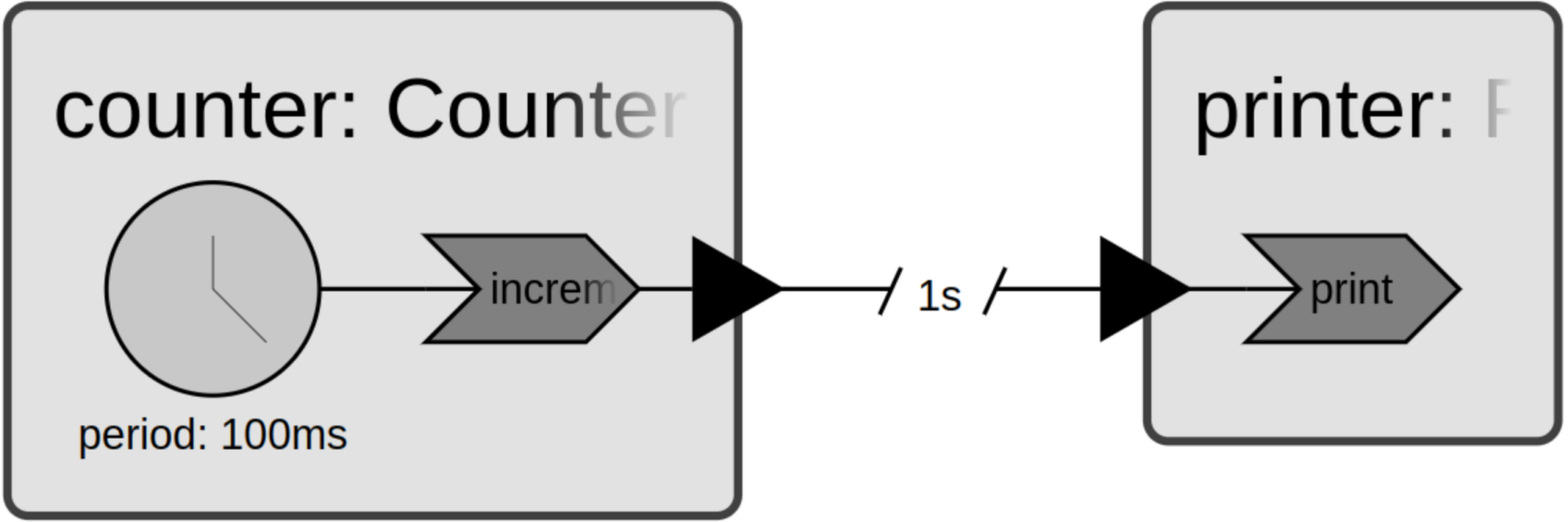
This produces the following output after waiting 1s:
$ ./build/ports
printer received 1 at 1000ms
printer received 2 at 1100ms
printer received 3 at 1200ms
printer received 4 at 1300ms
printer received 5 at 1400ms
printer received 6 at 1500ms
printer received 7 at 1600ms
printer received 8 at 1700ms
printer received 9 at 1800ms
...
Multiple Inputs
Reactors can define any number of input and output ports. While prior examples
had reactions with a single trigger, it’s also possible to trigger a reaction
from multiple inputs. Consider the following Multiplier reactor.
class Multiplier : public sdk::Reactor {
public:
  using sdk::Reactor::Reactor;
  [[nodiscard]] auto factor1() const -> const auto& { return factor1_; }
  [[nodiscard]] auto factor2() const -> const auto& { return factor2_; }
  [[nodiscard]] auto product() const -> const auto& { return product_; }

private:
  sdk::InputPort<std::uint64_t> factor1_{"factor1", context()};
  sdk::InputPort<std::uint64_t> factor2_{"factor2", context()};
  sdk::OutputPort<std::uint64_t> product_{"product", context()};

  class MultiplyReaction : public sdk::Reaction<Multiplier> {
    using sdk::Reaction<Multiplier>::Reaction;
    Trigger<std::uint64_t> factor1_trigger{self().factor1_, context()};
    Trigger<std::uint64_t> factor2_trigger{self().factor2_, context()};
    PortEffect<std::uint64_t> product_effect{self().product_, context()};
    void handler() final {
      if (factor1_trigger.is_present() && factor2_trigger.is_present()) {
        product_effect.set(*factor1_trigger.get() * *factor2_trigger.get());
      }
    }
  };

  void assemble() final { add_reaction<MultiplyReaction>("multiply"); }
};
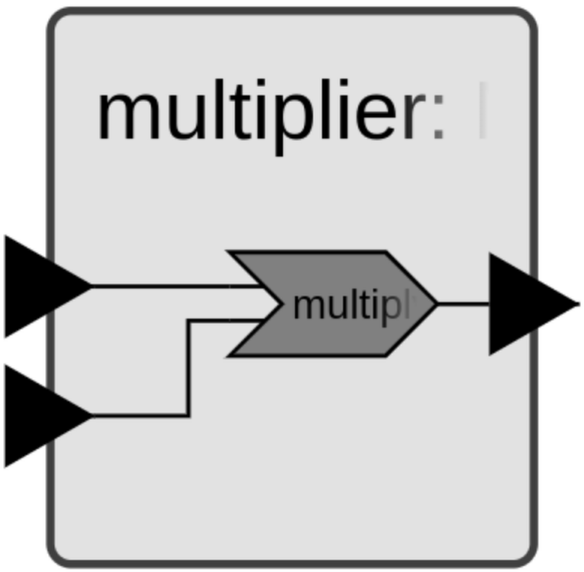
It declares two input ports, factor1_ and factor2_, as well as the output
port product_. The MultiplyReaction declares both input ports as triggers, so
it runs whenever either or both inputs receive a message. The is_present()
method tells you whether a particular trigger was activated and carries a value.
Note
Calling get() on a trigger where is_present() returns false returns an
absent ValueView. The view converts to bool, so presence check and read combine naturally:
if (auto value = input_trigger.get()) { use(*value); }.
If both triggers are present, the handler writes their product to the output port. If only one is present, no output is produced. Of course, other strategies are possible too — for instance, assuming a default value or storing the last observed value as a reactor member.
Now we have a few options for connecting Multiplier with Counter and
Printer. Here’s one pattern that works nicely.
auto main() -> int {
  sdk::Environment env{};
  Counter counter{"counter", env.context()};
  Printer printer{"printer", env.context()};
  Multiplier multiplier{"multiplier", env.context()};
  env.connect(counter.output(), multiplier.factor1());
  env.connect(counter.output(), multiplier.factor2());
  env.connect(multiplier.product(), printer.input());
  env.execute();
  return 0;
}
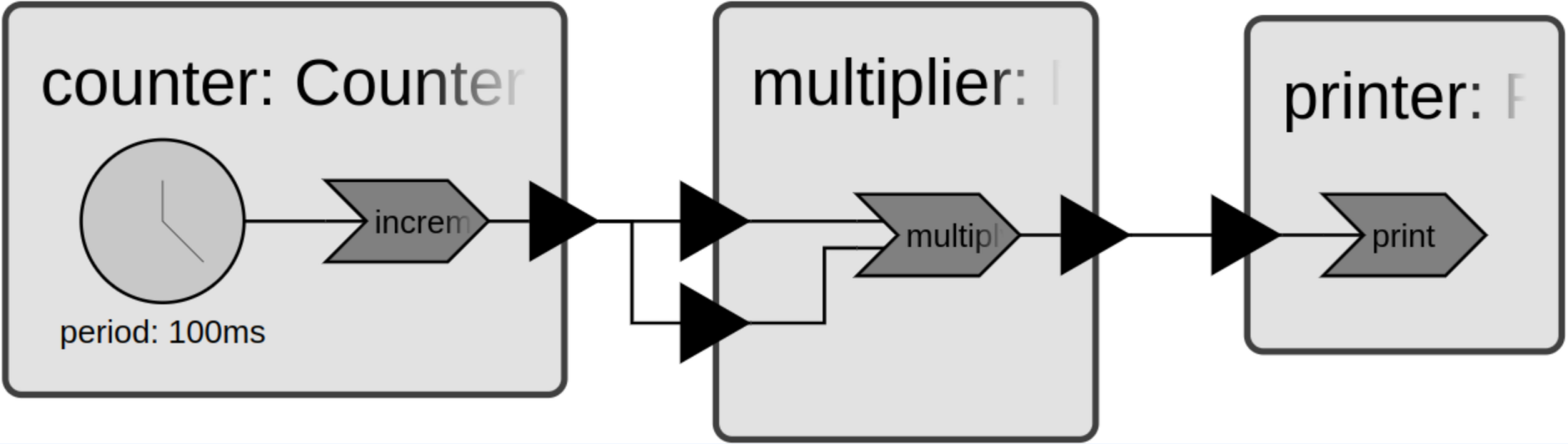
This connects counter.output() to both inputs of multiplier, delivering the
same messages to both ports. When executed, the program prints square numbers.
$ ./build/ports
printer received 1 at 0ms
printer received 4 at 100ms
printer received 9 at 200ms
printer received 16 at 300ms
printer received 25 at 400ms
printer received 36 at 500ms
printer received 49 at 600ms
printer received 64 at 700ms
printer received 81 at 800ms
...
You can achieve the same result using two separate Counter instances.
auto main() -> int {
  sdk::Environment env{};
  Counter counter1{"counter1", env.context()};
  Counter counter2{"counter2", env.context()};
  Printer printer{"printer", env.context()};
  Multiplier multiplier{"multiplier", env.context()};
  env.connect(counter1.output(), multiplier.factor1());
  env.connect(counter2.output(), multiplier.factor2());
  env.connect(multiplier.product(), printer.input());
  env.execute();
  return 0;
}
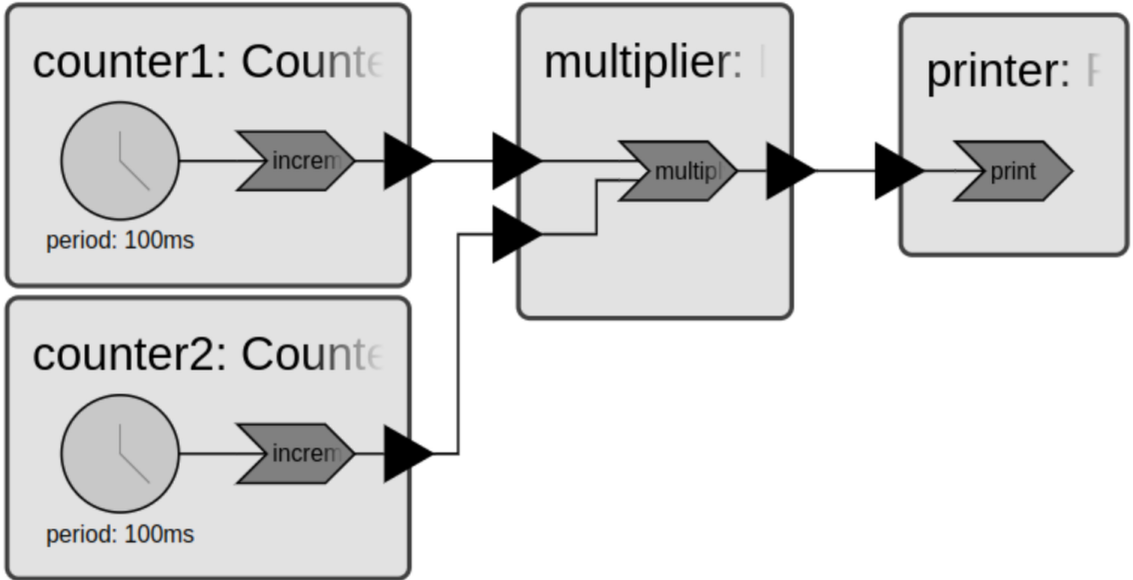
Regardless of how the reactors are connected, the runtime analyzes the
connections and the declared triggers and effects of each reaction to ensure
repeatable behavior. Concretely, the MultiplyReaction doesn’t need to wait for
inputs to arrive — the runtime guarantees that any reactions which could affect
its triggers have already executed. This means the value and is_present() status
of every trigger is always known when the handler runs.
We can also use delayed connections to offset the factors received by multiplier.
auto main() -> int {
  sdk::Environment env{};
  Counter counter1{"counter1", env.context()};
  Counter counter2{"counter2", env.context()};
  Printer printer{"printer", env.context()};
  Multiplier multiplier{"multiplier", env.context()};
  env.connect(counter1.output(), multiplier.factor1());
  env.connect(counter2.output(), multiplier.factor2(), 200ms);
  env.connect(multiplier.product(), printer.input());
  env.execute();
  return 0;
}
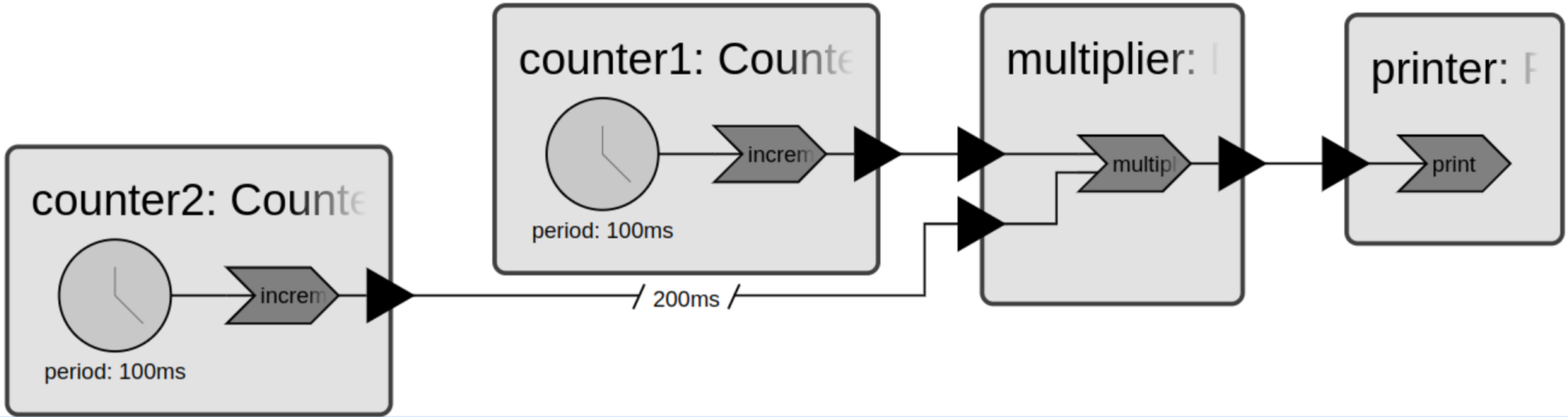
This produces the following output.
$ ./build/ports
printer received 3 at 200ms
printer received 8 at 300ms
printer received 15 at 400ms
printer received 24 at 500ms
printer received 35 at 600ms
printer received 48 at 700ms
printer received 63 at 800ms
...