Dependency Cycles
When a reaction writes to a port that (directly or indirectly) triggers another reaction, the runtime must establish an ordering between them. It infers this ordering from two sources:
Port connections: if reaction A writes to a port connected to reaction B’s trigger, A must execute before B.
Reaction order: within the same reactor, if multiple reactions trigger at the same timestamp, reactions registered earlier in
assemble()take priority over reactions registered later.
A dependency cycle occurs when these two sources of ordering information
contradict each other, making it impossible to find a valid execution order.
The runtime detects this at startup and throws an
xronos::sdk::ValidationError.
A range sensor example
Consider a Controller reactor that periodically polls a RangeSensor by
sending requests through a port and receiving distance readings back through
another port. The controller shuts down once the sensor reports an obstacle
within a safe threshold.
#include <algorithm>
#include <chrono>
#include <iostream>

#include "xronos/sdk.hh"

namespace sdk = xronos::sdk;

using namespace std::literals::chrono_literals;

static constexpr double kSafeDistanceM = 1.0;
static constexpr double kInitialDistanceM = 5.0;
static constexpr double kDistanceDecrementM = 0.1;

class RangeSensor : public sdk::Reactor {
public:
  using sdk::Reactor::Reactor;
  [[nodiscard]] auto request() const -> const auto& { return request_; }
  [[nodiscard]] auto response() const -> const auto& { return response_; }

private:
  sdk::InputPort<bool> request_{"request", context()};
  sdk::OutputPort<double> response_{"response", context()};
  double distance_{kInitialDistanceM};

  class OnRequestReaction : public sdk::Reaction<RangeSensor> {
    using sdk::Reaction<RangeSensor>::Reaction;
    Trigger<bool> request_trigger{self().request_, context()};
    PortEffect<double> response_effect{self().response_, context()};
    void handler() final {
      self().distance_ = std::max(0.0, self().distance_ - kDistanceDecrementM);
      response_effect.set(self().distance_);
    }
  };

  void assemble() final { add_reaction<OnRequestReaction>("on_request"); }
};

class Controller : public sdk::Reactor {
public:
  using sdk::Reactor::Reactor;
  [[nodiscard]] auto request() const -> const auto& { return request_; }
  [[nodiscard]] auto response() const -> const auto& { return response_; }

private:
  sdk::OutputPort<bool> request_{"request", context()};
  sdk::InputPort<double> response_{"response", context()};
  sdk::PeriodicTimer timer_{"timer", context(), 100ms};
  bool obstacle_detected_{false};

  class HandleResponseReaction : public sdk::Reaction<Controller> {
    using sdk::Reaction<Controller>::Reaction;
    Trigger<double> response_trigger{self().response_, context()};
    ShutdownEffect shutdown_effect{self().shutdown(), context()};
    void handler() final {
      auto elapsed =
          std::chrono::duration_cast<std::chrono::milliseconds>(elapsed_time());
      double distance = *response_trigger.get();
      std::cout << elapsed << ": range reading = " << distance << " m\n";
      if (distance < kSafeDistanceM && !self().obstacle_detected_) {
        self().obstacle_detected_ = true;
        std::cout << elapsed << ": WARNING — obstacle detected at " << distance
                  << " m\n";
        shutdown_effect.trigger_shutdown();
      }
    }
  };

  class SendRequestReaction : public sdk::Reaction<Controller> {
    using sdk::Reaction<Controller>::Reaction;
    Trigger<void> timer_trigger{self().timer_, context()};
    PortEffect<bool> request_effect{self().request_, context()};
    void handler() final { request_effect.set(true); }
  };

  void assemble() final {
    add_reaction<HandleResponseReaction>("handle_response");
    add_reaction<SendRequestReaction>("send_request");
  }
};

auto main() -> int {
  sdk::Environment env{};
  Controller controller{"controller", env.context()};
  RangeSensor sensor{"sensor", env.context()};
  env.connect(controller.request(), sensor.request());
  env.connect(sensor.response(), controller.response());
  env.execute();
  return 0;
}
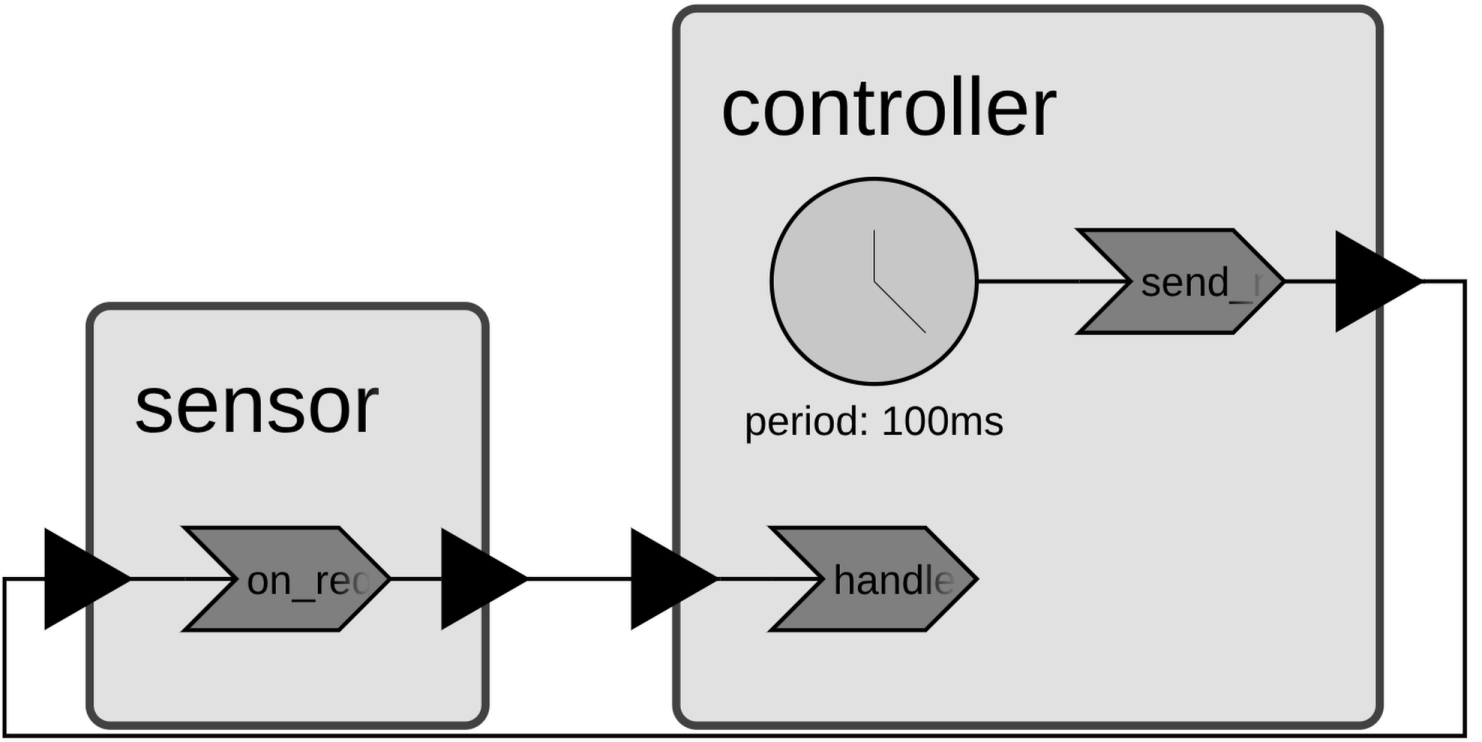
RangeSensor exposes a request input and a response output. Each time it
receives a request it decrements the simulated distance and writes the new value
to response. Controller defines two reactions. HandleResponseReaction is
triggered by response and reads the distance. SendRequestReaction is
triggered by a periodic timer and writes to request.
Create a CMakeLists.txt in the same directory:
cmake_minimum_required(VERSION 3.28)

project(dependency_cycles LANGUAGES CXX)

set(XRONOS_SDK_VERSION "0.14.0" CACHE STRING "Xronos SDK version")
include(FetchContent)
FetchContent_Declare(
  "xronos-sdk"
  URL https://github.com/xronos-inc/xronos/releases/download/v${XRONOS_SDK_VERSION}/xronos-sdk-${XRONOS_SDK_VERSION}-Linux-${CMAKE_SYSTEM_PROCESSOR}.tar.gz
)
FetchContent_MakeAvailable(xronos-sdk)
set(xronos-sdk_DIR ${xronos-sdk_SOURCE_DIR}/share/cmake/xronos-sdk)

find_package(xronos-sdk)

add_executable(range_sensor range_sensor.cc)
target_link_libraries(range_sensor xronos::xronos-sdk)
Configure, build, and run:
$ cmake -B build
$ cmake --build build --target range_sensor_cycle
$ ./build/range_sensor_cycle
It fails immediately:
$ ./build/range_sensor
[ERROR] There is a dependency cycle involving the following reactions:
  - controller.handle_response
  - sensor.on_request
  - controller.send_request
terminate called after throwing an instance of 'xronos::sdk::ValidationError'
  what():  The reactor program is invalid and cannot be executed.
The cycle arises as follows:
HandleResponseReactionis registered beforeSendRequestReactioninController::assemble(), so the runtime infers thatHandleResponseReactionmust execute beforeSendRequestReactionat each timestamp.But
SendRequestReactionwrites tocontroller.request, which is connected tosensor.request, which triggersOnRequestReaction, which writes tosensor.response, which triggersHandleResponseReaction. SoSendRequestReactionmust execute beforeHandleResponseReaction.
These two constraints directly contradict each other.
Fix 1: Reorder the reactions
The simplest fix is to register SendRequestReaction before
HandleResponseReaction in assemble(). The runtime then infers that
SendRequestReaction runs first, which is consistent with the data flow through
the ports. The reaction class definitions themselves do not need to move — only
the add_reaction call order matters.
void assemble() final {
  add_reaction<SendRequestReaction>("send_request");
  add_reaction<HandleResponseReaction>("handle_response");
}
The program now runs and prints distance readings until an obstacle is detected:
$ ./build/range_sensor
0ms: range reading = 4.9 m
100ms: range reading = 4.8 m
200ms: range reading = 4.7 m
...
3900ms: range reading = 1 m
4000ms: range reading = 0.9 m
4000ms: WARNING — obstacle detected at 0.9 m
Fix 2: Introduce a delay
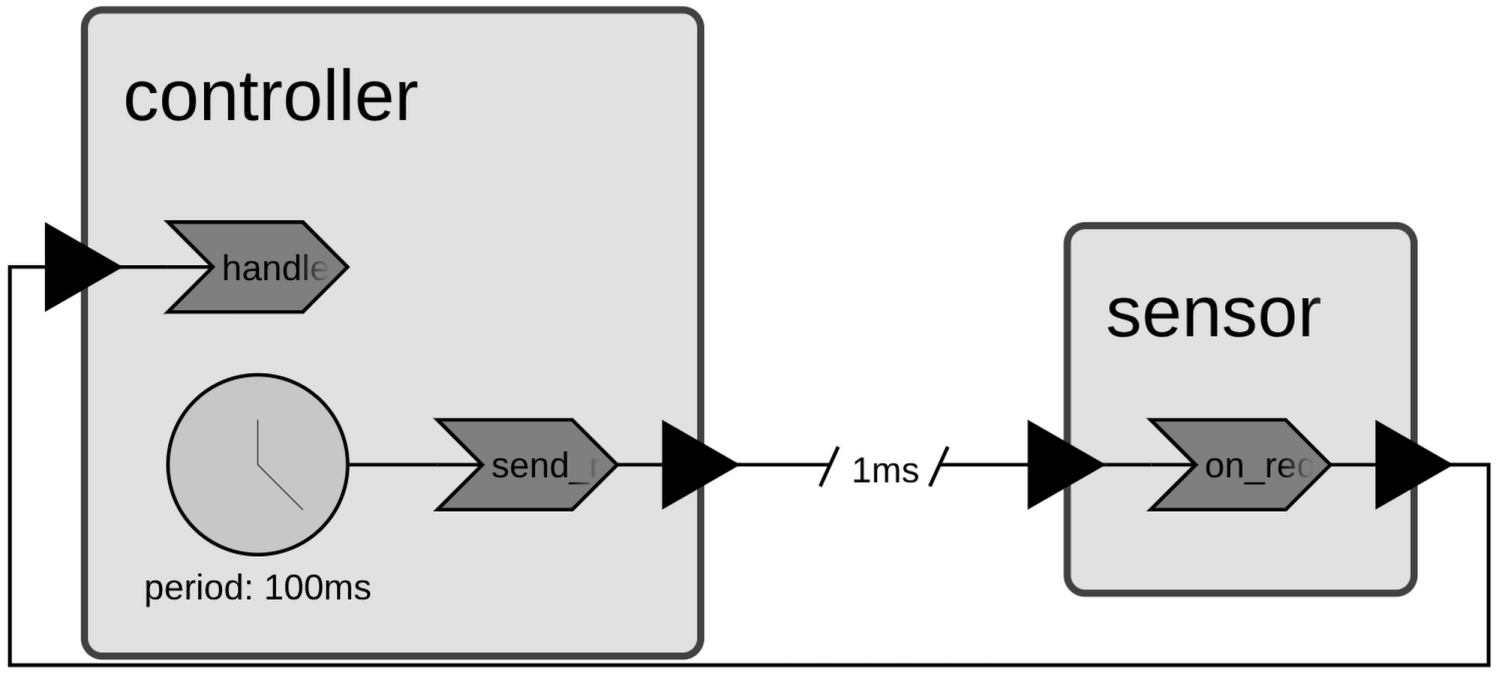
Reordering reactions is not always possible. In those cases, a delayed connection breaks the cycle.
A delayed connection does not deliver the message at the current timestamp. Instead it schedules a new event to deliver the message at a later timestamp. Since with the delay the message arrives at a strictly later timestamp, there is no same-step ordering constraint between the sender and the receiver, and the cycle disappears.
The following program keeps the original reaction order from
range_sensor_cycle.cc (with HandleResponseReaction first) and adds a 1 ms
delay to the connection from controller.request to sensor.request:
auto main() -> int {
  sdk::Environment env{};
  Controller controller{"controller", env.context()};
  RangeSensor sensor{"sensor", env.context()};
  env.connect(controller.request(), sensor.request(), 1ms);
  env.connect(sensor.response(), controller.response());
  env.execute();
  return 0;
}
$ ./build/range_sensor
1ms: range reading = 4.9 m
101ms: range reading = 4.8 m
201ms: range reading = 4.7 m
...
3901ms: range reading = 1 m
4001ms: range reading = 0.9 m
4001ms: WARNING — obstacle detected at 0.9 m
Note
Reordering reactions is generally preferred when possible, because it preserves the zero-delay semantics of the connection. Delays change the timing of messages and should be chosen deliberately.
Fix 3: Decouple request and response in the sensor
Another approach is to break the cycle inside RangeSensor itself, without
changing the Controller reaction order or adding a connection delay. Instead
of responding in the same reaction that receives the request, the sensor uses a
ProgrammableTimer to schedule the
response 1 ms later. This separates the two concerns into two reactions:
SendResponseReaction— triggered by the programmable timer — sends the distance reading.OnRequestReaction— triggered by therequestport — updates the distance and schedules the timer.
SendResponseReaction is registered before OnRequestReaction in
assemble().
Note
SendResponseReaction must be registered before OnRequestReaction. If their
order were reversed, the runtime would infer that Controller first receives
and then sends, but also that the sensor first receives and then sends, creating
a causality problem.
class RangeSensor : public sdk::Reactor {
public:
  using sdk::Reactor::Reactor;
  [[nodiscard]] auto request() const -> const auto& { return request_; }
  [[nodiscard]] auto response() const -> const auto& { return response_; }

private:
  sdk::InputPort<bool> request_{"request", context()};
  sdk::OutputPort<double> response_{"response", context()};
  sdk::ProgrammableTimer<void> send_timer_{"send_timer", context()};
  double distance_{kInitialDistanceM};

  class SendResponseReaction : public sdk::Reaction<RangeSensor> {
    using sdk::Reaction<RangeSensor>::Reaction;
    Trigger<void> send_timer_trigger{self().send_timer_, context()};
    PortEffect<double> response_effect{self().response_, context()};
    void handler() final { response_effect.set(self().distance_); }
  };

  class OnRequestReaction : public sdk::Reaction<RangeSensor> {
    using sdk::Reaction<RangeSensor>::Reaction;
    Trigger<bool> request_trigger{self().request_, context()};
    ProgrammableTimerEffect<void> send_timer_effect{self().send_timer_, context()};
    void handler() final {
      self().distance_ = std::max(0.0, self().distance_ - kDistanceDecrementM);
      send_timer_effect.schedule(1ms);
    }
  };

  void assemble() final {
    add_reaction<SendResponseReaction>("send_response");
    add_reaction<OnRequestReaction>("on_request");
  }
};
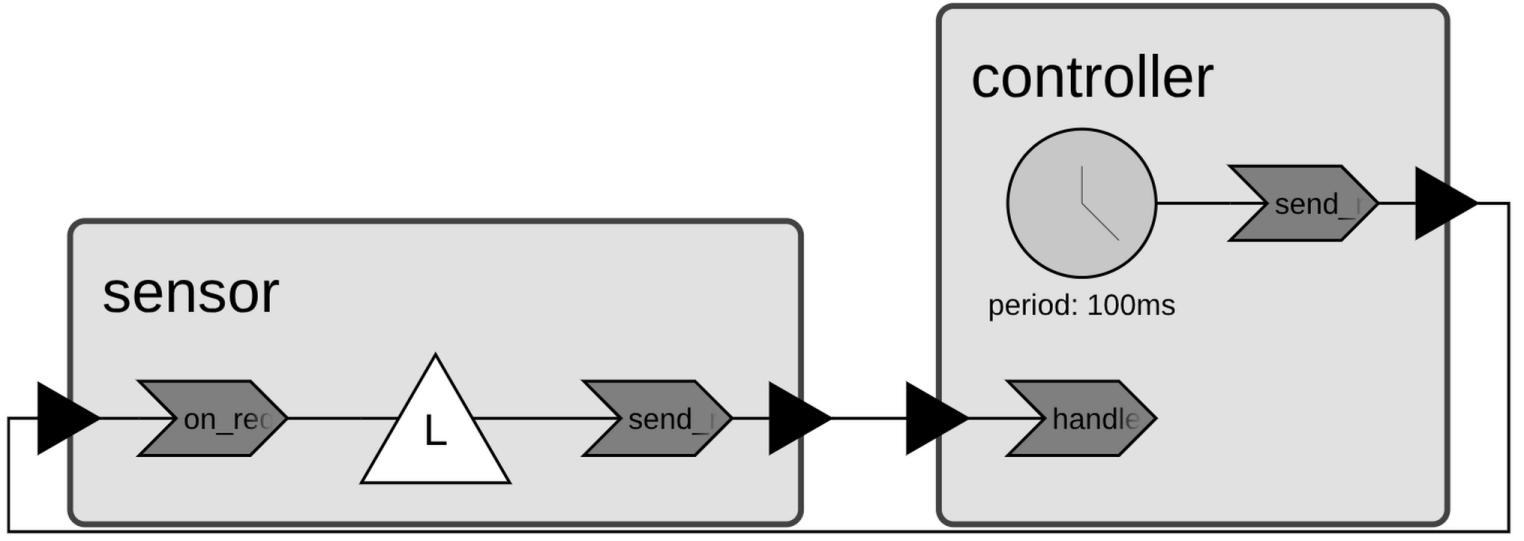
The cycle disappears because OnRequestReaction no longer writes directly to
response. Its only effect is scheduling send_timer_, which fires at a
strictly later timestamp. The response therefore arrives at the controller in a
new timestamp, with no same-step ordering constraint between the two reactors.
$ ./build/range_sensor
1ms: range reading = 4.9 m
101ms: range reading = 4.8 m
201ms: range reading = 4.7 m
...
3901ms: range reading = 1 m
4001ms: range reading = 0.9 m
4001ms: WARNING — obstacle detected at 0.9 m