Periodic Timers
Xronos offers several ways to implement timed behavior, and the easiest place to
start is with periodic timers. To follow along, copy the example below into a
new file called timer.cc.
#include <chrono>
#include <iostream>

#include "xronos/sdk.hh"

namespace sdk = xronos::sdk;

using namespace std::literals::chrono_literals;

constexpr int max_count = 5;

class Timed : public sdk::Reactor {
public:
  Timed(std::string_view name, sdk::Context ctx, sdk::Duration period)
      : sdk::Reactor(name, ctx), timer_{"timer", context(), period} {}

private:
  sdk::PeriodicTimer timer_;
  int count_{0};

  class HelloReaction : public sdk::Reaction<Timed> {
    using sdk::Reaction<Timed>::Reaction;
    Trigger<void> startup_trigger{self().startup(), context()};
    void handler() final {
      std::cout << current_time() << ": " << self().name()
                << " says 'Hello!'\n";
    }
  };

  class OnTimerReaction : public sdk::Reaction<Timed> {
    using sdk::Reaction<Timed>::Reaction;
    Trigger<void> timer_trigger{self().timer_, context()};
    ShutdownEffect shutdown_effect{self().shutdown(), context()};
    void handler() final {
      self().count_++;
      std::cout << current_time() << ": " << self().name()
                << "'s timer triggered (count=" << self().count_ << ")\n";
      if (self().count_ == max_count) {
        shutdown_effect.trigger_shutdown();
      }
    }
  };

  class GoodbyeReaction : public sdk::Reaction<Timed> {
    using sdk::Reaction<Timed>::Reaction;
    Trigger<void> shutdown_trigger{self().shutdown(), context()};
    void handler() final {
      std::cout << current_time() << ": " << self().name()
                << " says 'Goodbye!'\n";
    }
  };

  void assemble() final {
    add_reaction<HelloReaction>("hello");
    add_reaction<OnTimerReaction>("on_timer");
    add_reaction<GoodbyeReaction>("goodbye");
  }
};

auto main() -> int {
  sdk::Environment env{};
  Timed timed{"timed", env.context(), 1s};
  env.execute();
  return 0;
}
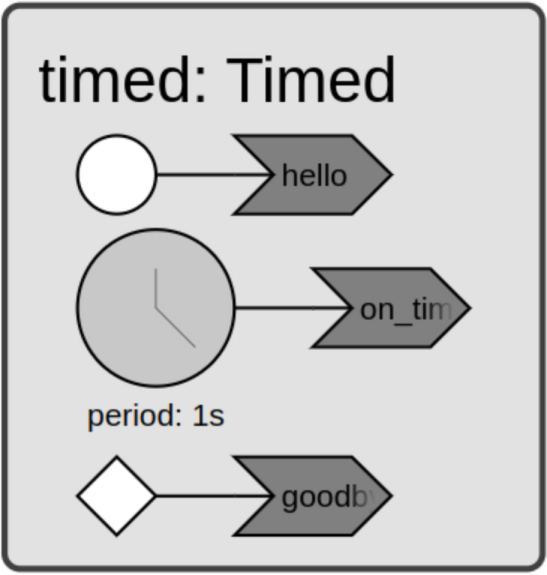
To create a periodic timer, declare a PeriodicTimer
as a member of your reactor class. The constructor takes a name, the reactor’s
context, a period, and an optional offset. In our Timed reactor, the period is
passed in as a constructor argument, which makes it easy to reuse the same
reactor class with different timing configurations.
The Timed reactor also keeps a count_ member variable, initialized to 0,
which we’ll use to track how many timer events have fired.
The reactor defines three reactions. The HelloReaction will feel familiar from
the Hello World example — it prints the current time, the reactor’s
name, and ‘Hello!’. The GoodbyeReaction produces similar output in response to
the builtin shutdown() event.
The OnTimerReaction is where things get interesting. It declares the timer as
its trigger via a Trigger<void> member, and also defines a ShutdownEffect
that can be used to stop the program. Here’s the handler:
void handler() final {
  self().count_++;
  std::cout << current_time() << ": " << self().name()
            << "'s timer triggered (count=" << self().count_ << ")\n";
  if (self().count_ == max_count) {
    shutdown_effect.trigger_shutdown();
  }
}
The handler increments count_, prints the current time, the timer’s name, and
the current count, and then checks whether the count has reached max_count.
When it has, trigger_shutdown() is called to stop the program.
Each reaction is wired up in the assemble()
method using add_reaction():
void assemble() final {
  add_reaction<HelloReaction>("hello");
  add_reaction<OnTimerReaction>("on_timer");
  add_reaction<GoodbyeReaction>("goodbye");
}
In the same directory, create a CMakeLists.txt using
FetchContent
to pull in the Xronos SDK. For alternative integration methods, see
CMake Integration and Installation.
cmake_minimum_required(VERSION 3.28)

project(timer LANGUAGES CXX)

set(XRONOS_SDK_VERSION "0.14.0" CACHE STRING "Xronos SDK version")
include(FetchContent)
FetchContent_Declare(
  "xronos-sdk"
  URL https://github.com/xronos-inc/xronos/releases/download/v${XRONOS_SDK_VERSION}/xronos-sdk-${XRONOS_SDK_VERSION}-Linux-${CMAKE_SYSTEM_PROCESSOR}.tar.gz
)
FetchContent_MakeAvailable(xronos-sdk)
set(xronos-sdk_DIR ${xronos-sdk_SOURCE_DIR}/share/cmake/xronos-sdk)

find_package(xronos-sdk)

add_executable(timer timer.cc)
target_link_libraries(timer xronos::xronos-sdk)
Configure the project and build:
$ cmake -B build
$ cmake --build build --target timer
When executed, the program runs for about 4 seconds and produces output similar to the following:
$ ./build/timer
2026-04-22 12:28:51.762469573: timed says 'Hello!'
2026-04-22 12:28:51.762469573: timed's timer triggered (count=1)
2026-04-22 12:28:52.762469573: timed's timer triggered (count=2)
2026-04-22 12:28:53.762469573: timed's timer triggered (count=3)
2026-04-22 12:28:54.762469573: timed's timer triggered (count=4)
2026-04-22 12:28:55.762469573: timed's timer triggered (count=5)
2026-04-22 12:28:55.762469573: timed says 'Goodbye!'
Take a close look at the printed times. The time from HelloReaction
matches the first line printed by OnTimerReaction. That’s because we didn’t
configure an offset, so the first timer event fires immediately at startup —
simultaneous with the startup() event. You’ll
also notice that the individual timer events are spaced exactly one second apart.
How does Xronos achieve that kind of precision? Time in the Xronos SDK works
differently from the wall-clock time most programs use. The runtime manages its
own internal clock, and that clock is central to how program execution is
controlled. One key property: the time a reaction observes is always equal to
the time of the event that triggered it. As a result, any two calls to
current_time() within the same reaction handler
will return the same value.
This synchrony of time carries across multiple reactors as well. Try
modifying main() as shown below, so the program runs three Timed reactors
with periods of 1 second, 2 seconds, and 3 seconds.
auto main() -> int {
  sdk::Environment env{};
  Timed timed1{"timed1", env.context(), 1s};
  Timed timed2{"timed2", env.context(), 2s};
  Timed timed3{"timed3", env.context(), 3s};
  env.execute();
  return 0;
}
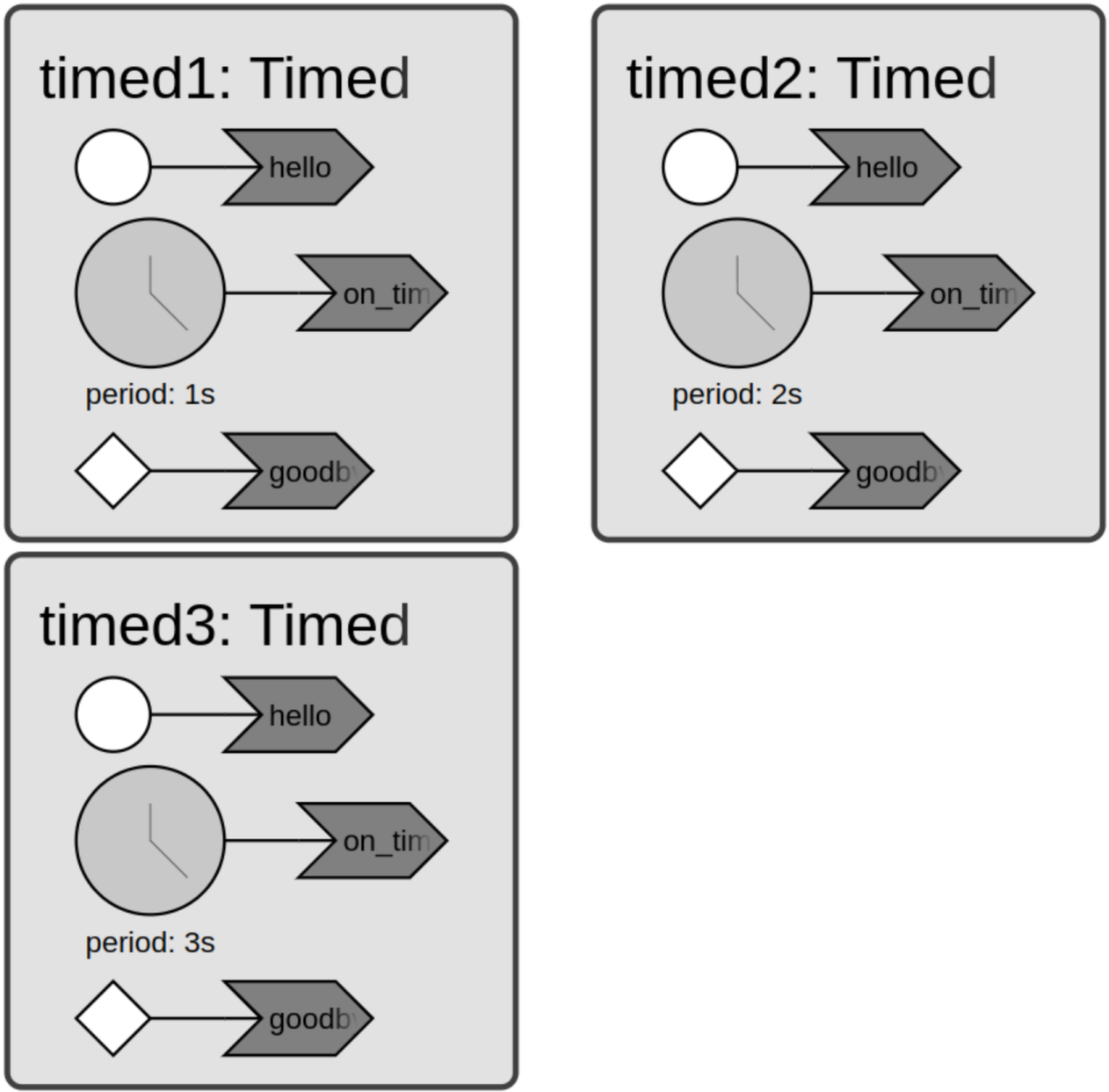
Running the program produces output similar to the following:
$ ./build/timer
2026-04-22 12:28:19.054021593: timed3 says 'Hello!'
2026-04-22 12:28:19.054021593: timed3's timer triggered (count=1)
2026-04-22 12:28:19.054021593: timed2 says 'Hello!'
2026-04-22 12:28:19.054021593: timed2's timer triggered (count=1)
2026-04-22 12:28:19.054021593: timed1 says 'Hello!'
2026-04-22 12:28:19.054021593: timed1's timer triggered (count=1)
2026-04-22 12:28:20.054021593: timed1's timer triggered (count=2)
2026-04-22 12:28:21.054021593: timed2's timer triggered (count=2)
2026-04-22 12:28:21.054021593: timed1's timer triggered (count=3)
2026-04-22 12:28:22.054021593: timed3's timer triggered (count=2)
2026-04-22 12:28:22.054021593: timed1's timer triggered (count=4)
2026-04-22 12:28:23.054021593: timed2's timer triggered (count=3)
2026-04-22 12:28:23.054021593: timed1's timer triggered (count=5)
2026-04-22 12:28:23.054021593: timed3 says 'Goodbye!'
2026-04-22 12:28:23.054021593: timed2 says 'Goodbye!'
2026-04-22 12:28:23.054021593: timed1 says 'Goodbye!'
Notice how all three reactors say ‘Hello!’ or ‘Goodbye!’ at the same time, and how the individual timer events align with each other.