YAML Dry Run
The Xronos dry run tool simulates the execution of reactor programs defined in YAML. Instead of executing real application logic, each reaction sleeps (or burns CPU cycles) for a configured duration to represent its expected execution time. Similar to the Xronos SDK, the Xronos Dashboard records and shows execution traces and the VS Code Extension visualizes the model as a diagram. This makes it easy to prototype program structure, reason about timing and scheduling, and test deadline configurations — all without writing any application code.
Usage
The dry run tool is integrated into the Xronos VS Code Extension.
To get started, create a file called hello_world.yaml with the following
content:
hello:
  on_startup:
    type: Reaction
    triggers:
      - startup
    execution_time: 10ms
This defines a single reactor with one reaction that runs at startup and simulates 10 ms of execution time.
Diagram Rendering
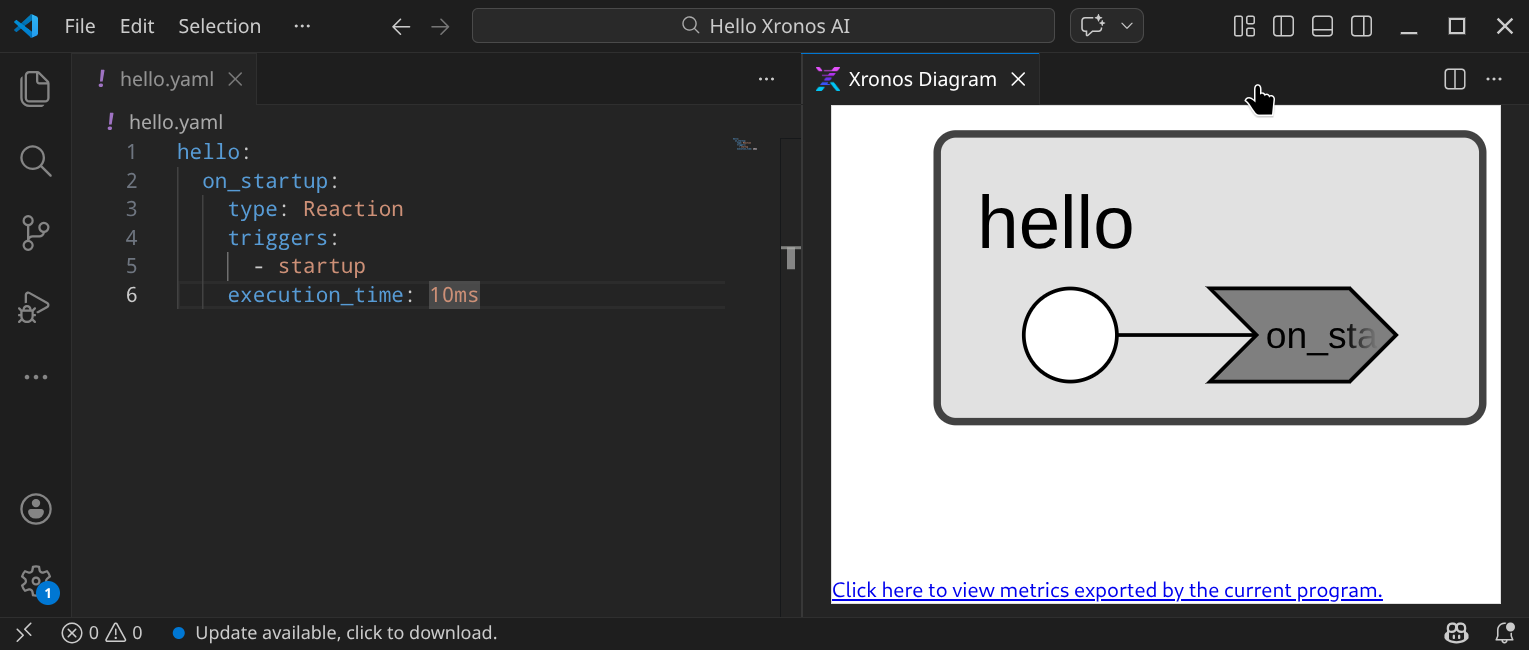
Open hello_world.yaml in VS Code and bring up the Command Palette using
Ctrl+Shift+P. Type Xronos: Render Diagram and
select the corresponding entry. This visualizes the model as a diagram without
executing it.
Dry Running
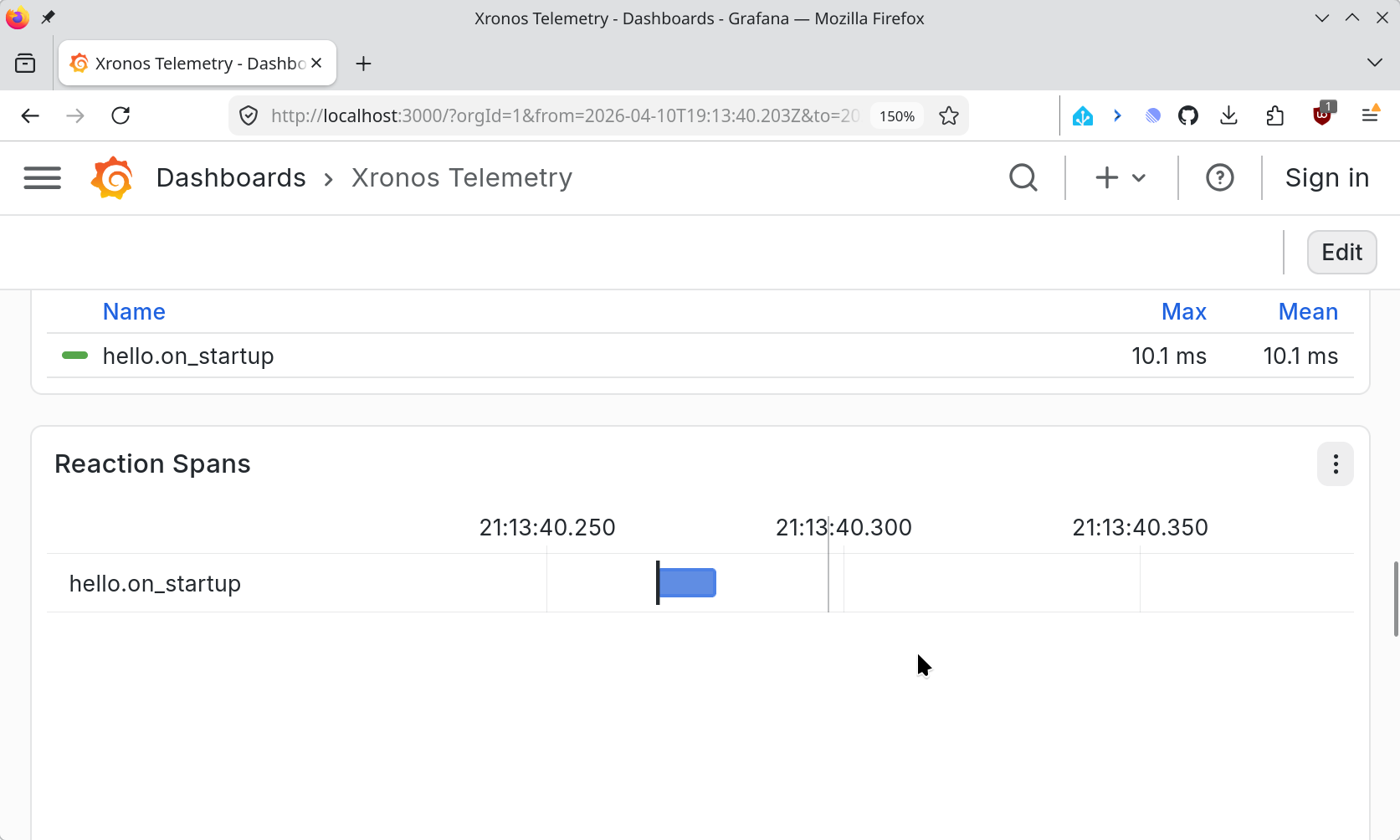
To execute the model, open the Command Palette again and run Xronos: Dry Run. This simulates each reaction’s execution time and records telemetry to the Xronos Dashboard. For the hello world example, this shows a single reaction execution.
Note
The dry run command exports telemetry data and assumes that the Xronos Dashboard is up and running. It will show an error message if the dashboard is not available.
Model Structure
A model is a YAML file that describes a set of reactors and the connections between them. Each top-level key names a reactor.
my_reactor:
  # elements go here
Reactors
A reactor is a named container of elements: timers, ports, reactions, and
sub-reactors. At the top level of the YAML file, each key defines a top-level
reactor. Nested reactors are declared with type: Reactor.
Elements
Each element inside a reactor is declared by name. Elements with fields use a
type: discriminator. Elements with no fields can be declared by using the
type: discriminator or by assigning their type name directly.
input1:
  type: InputPort
input2: InputPort  # shortcut for 'type: InputPort'
PeriodicTimer
Fires a recurring event at a fixed period. An optional offset delays the first firing.
timer:
  type: PeriodicTimer
  period: 100ms     # required
  offset: 50ms      # optional (default: 0)
InputPort and OutputPort
Ports are endpoints for connections between reactors. They are declared without additional fields using the type name as the value:
input: InputPort
output: OutputPort
Startup and Shutdown
Special events that fire exactly once: Startup when the program begins, and Shutdown when it ends. Like ports, they are declared using the type name as the value:
startup: Startup
shutdown: Shutdown
Note that startup and shutdown elements are synthesized automatically for
each reactor unless they are created explicitly in the model.
ProgrammableTimer
A one-shot timer that a reaction arms explicitly with a specified delay.
delay: ProgrammableTimer
Reaction
A reaction is the unit of work in a reactor. It is triggered by one or more events, optionally sets port values and arms programmable timers, and runs for a configured execution_time.
on_timer:
  type: Reaction
  triggers: [timer]          # required: list of triggers
  port_effects: [output]     # optional: output ports this reaction sets
  programmable_timer_effects: # optional: programmable timers this reaction arms
    - on: delay
      delay: 50ms
  execution_time: 100ms       # required: simulated execution duration
  deadline: 200ms             # optional: deadline on reaction completion
triggers:List of elements that trigger the reaction.port_effects:List of ports that the reaction declares an effect on. When the reaction executes, it automatically sets all port effects.programmable_timer_effects:List of programmable timers that the reaction declares an effect on. Each entry must include a reference to the programmable timer (on:) and a delay that is applied when scheduling a new event on the timer. When the reaction executes, it automatically schedules a new event using the given delay.
Nested Reactors
Reactors may contain other reactors. Nested reactors are declared analogously to other elements, using type: Reactor.
top:
  nested:
    type: Reactor
    input: InputPort
    # ...
Connections
Connections wire ports together across reactors. They are declared under the
special __connections__ key.
__connections__:
  - from: source.output
    to: sink.input
  - from: stage1.output
    to: stage2.input
    delay: 10ms         # optional: introduce an internal clock delay on the connection
__connections__ can appear at the top level to connect top-level reactors, or inside a reactor to connect its children.
Name Resolution
Reaction triggers and effects as well as the from and to port of connections
are interpreted as element names relative to the reactor that contains the
reaction or connection list. Elements within the same reactor can be referenced
simply by their name. Elements contained in a nested reactor can be referenced
using their qualified name <reactor>.<element>. Connections declared in the
top-level must use fully qualified names.
Duration Format
All duration values (periods, offsets, execution times, deadlines, delays) are strings in the following format:
<value><unit>
Supported units: ns, us, ms, s, m, h. Examples: 100ms, 1s, 50us, 500ms, 1h.
Examples
Pipeline
A chain of reactors passing data through output and input ports.
source:
  timer:
    type: PeriodicTimer
    period: 100ms
  output: OutputPort
  on_timer:
    type: Reaction
    triggers: [timer]
    port_effects: [output]
    execution_time: 5ms
stage1:
  input: InputPort
  output: OutputPort
  work:
    type: Reaction
    triggers: [input]
    port_effects: [output]
    execution_time: 25ms
stage2:
  input: InputPort
  output: OutputPort
  work:
    type: Reaction
    triggers: [input]
    port_effects: [output]
    execution_time: 25ms
stage3:
  input: InputPort
  output: OutputPort
  work:
    type: Reaction
    triggers: [input]
    port_effects: [output]
    execution_time: 25ms
sink:
  input: InputPort
  on_input:
    type: Reaction
    triggers: [input]
    execution_time: 5ms

__connections__:
  - from: source.output
    to: stage1.input
  - from: stage1.output
    to: stage2.input
  - from: stage2.output
    to: stage3.input
  - from: stage3.output
    to: sink.input

Hierarchy
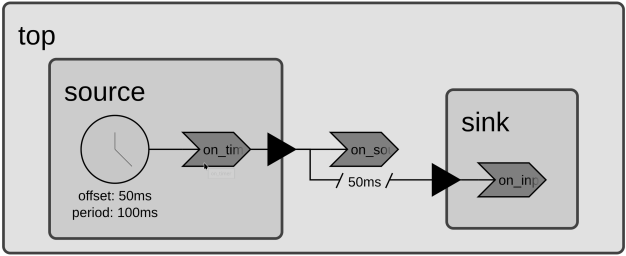
A reactor that contains nested child reactors. Child reactors use type: Reactor. Connections inside a reactor wire its children together.
top:
  source:
    type: Reactor
    timer:
      type: PeriodicTimer
      period: 100ms
      offset: 50ms
    output: OutputPort
    on_timer:
      type: Reaction
      triggers: [timer]
      port_effects: [output]
      execution_time: 10ms
  sink:
    type: Reactor
    input: InputPort
    on_input:
      type: Reaction
      triggers: [input]
      execution_time: 10ms
  __connections__:
    - from: source.output
      to: sink.input
      delay: 50ms
  on_source:
    type: Reaction
    triggers: [source.output]
    execution_time: 5ms
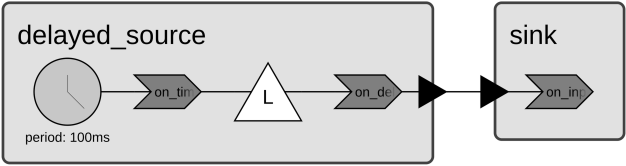
Programmable Timer
A reaction that uses a ProgrammableTimer to schedule a delayed event.
delayed_source:
  timer:
    type: PeriodicTimer
    period: 100ms
  delay: ProgrammableTimer
  output: OutputPort
  on_timer:
    type: Reaction
    triggers: [timer]
    programmable_timer_effects:
      - on: delay
        delay: 50ms
    execution_time: 20ms
  on_delay:
    type: Reaction
    triggers: [delay]
    port_effects: [output]
    execution_time: 20ms
sink:
  input: InputPort
  on_input:
    type: Reaction
    triggers: [input]
    execution_time: 10ms

__connections__:
  - from: delayed_source.output
    to: sink.input